Technical Issues - Ocean Optics Support

FTG Software supports Ocean Optics (OOI) spectrometers via OmniDriver. SpectraSuite is not required. The free OmniDriver runtime can be downloaded here. Reboot after installing OmniDriver.

OmniDriver does not currently support 64-bit Windows;
 an update should be available mid 2010.


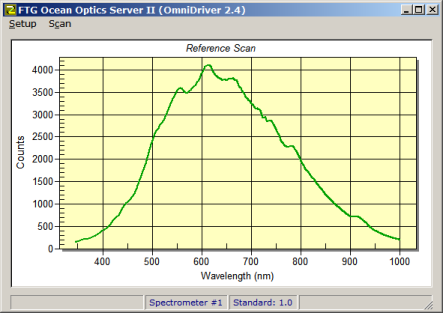
The FTG Ocean Optics Server (FTG OOS) is an ActiveX EXE which provides an interface to OmniDriver. The advantage of this approach is that the server can be run standalone for testing and then run invisibly from FilmStar. Since the FTG OOS processes data (converts to %R or %T) it can be used with DESIGN as well as MEASURE. An FTG HASP enabled for MEASURE or Scantraq is required.

When installing FilmStar (Setup32.exe), select Ocean Optics Server in the Select Components dialog. This installs the server (Ocean2.exe) as well as the FilmStar BASIC macros listed below. It also installs Scan Method OOI2 Trns.scw which references the BASIC macros.

By 'process data' we mean that the server manipulates Dark, Reference and Sample scans. A Standard File provides means to include known reflectance values corresponding to the Reference scan. The Standard is what the Reference is known to be.

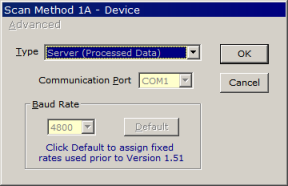
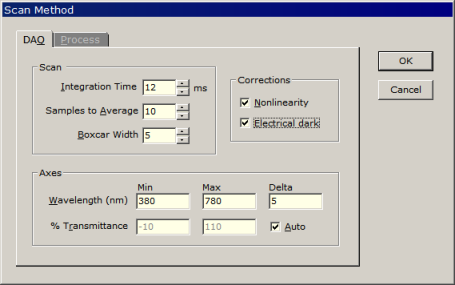
This is different from a 'raw data' server where the processing takes place in the host application. BASIC macros for processed data are simpler. As shown below, the FTG OOS includes a Scan Method dialog, but in actual operation, settings are specified in FilmStar BASIC macro code (listings at bottom).

To help determine values for an FTG OOS Scan Method, run SpectraSuite to quickly determine Integration Time and other factors.


Setup parameters in FTG Ocean Optics Server. Most
important is setting Integration Time below saturation level.

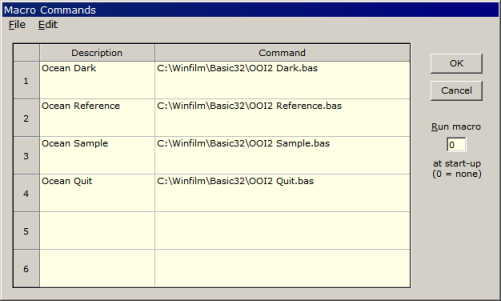
In DESIGN the Macro Commands dialog assigns scan functions to macro buttons:


Assigning scans to macro buttons 1-4 in DESIGN

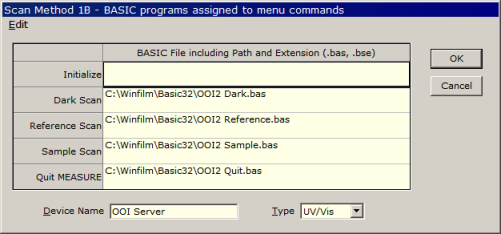
You could use the same Macro Commands in MEASURE, but it is better to assign macros in the Scan Method 1B dialog shown below. Dark and Reference scans are triggered by Setup menu commands, while the Sample scan is assigned to the Scan button. The Scan Method stores the required macros.


Assigning scans to Setup Menu (Dark, Reference)
and Scan button (Sample) in MEASURE

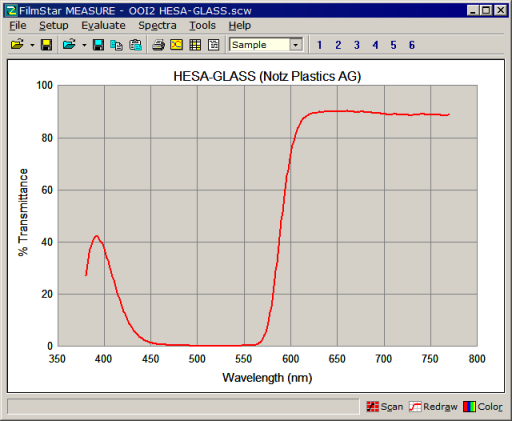
Ultimately, Ocean Optics scanning appears seamlessly built into DESIGN or MEASURE:


Hesa-Glas 5063L (light red appearance)

FilmStar BASIC code listings for OOI Server (OmniDriver)
Excel users should have no problem adapting this code.

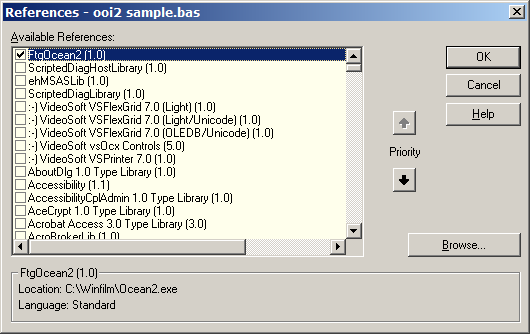
'#Reference {36EC65E7-700D-434D-883C-23822D36BDE8}#1.0#0#C:\Winfilm\Ocean2.exe#FtgOcean2
' OOI2 Dark.bas for FilmStar DESIGN, MEASURE/Scantraq
' Copyright 2010 FTG Software Associates
' Uses OmniDriver
'
' ****************************************************
'    Warning: Save modified program with new name!!!
' ****************************************************
Option Explicit
Option Base 1
DefInt I-N
DefSng A-H, O-Z
Public Daq(6) As Integer
Public s1 As FtgOcean2.clsDAQ
Public Enum ScanConstants
    DARK = 0
    REFERENCE = 1
    SAMPLE = 2
    SPEC_ID = 0   ' 0 to 7 (Spectrometer #1 to #8)
End Enum
Sub Main
    Dim kErr
    On Error Resume Next
    Set s1 = New FtgOcean2.clsDAQ
    Daq(1) = 12     ' integration time ms
    Daq(2) = 20     ' # of scans to average
    Daq(3) = 5      ' boxcar width pixels
    Daq(4) = 1      ' correct for nonlinear response
    Daq(6) = 1      ' correct for electrical dark
    s1.Scan DARK, SPEC_ID, Daq(), kErr
    If kErr Then MsgBox "DAQ error: dark scan not saved", vbExclamation, "OOI Server"
End Sub
'#Reference {36EC65E7-700D-434D-883C-23822D36BDE8}#1.0#0#C:\Winfilm\Ocean2.exe#FtgOcean2
' OOI2 Reference.bas for FilmStar DESIGN, MEASURE/Scantraq
' Copyright 2010 FTG Software Associates
' Uses OmniDriver
'
' ****************************************************
'    Warning: Save modified program with new name!!!
' ****************************************************
Option Explicit
Option Base 1
DefInt I-N
DefSng A-H, O-Z
Public Daq(6) As Integer
Public s1 As FtgOcean2.clsDAQ
Public Enum ScanConstants
    DARK = 0
    REFERENCE = 1
    SAMPLE = 2
    SPEC_ID = 0   ' 0 to 7 (Spectrometer #1 to #8)
End Enum
Sub Main
    Dim kErr
    On Error Resume Next
    Set s1 = New FtgOcean2.clsDAQ
    Daq(1) = 12     ' integration time ms
    Daq(2) = 20     ' # of scans to average
    Daq(3) = 5      ' boxcar width pixels
    Daq(4) = 1      ' correct for nonlinear response
    Daq(6) = 1      ' correct for electrical dark
    s1.Scan REFERENCE, SPEC_ID, Daq(), kErr
    If kErr Then MsgBox "DAQ error: reference data not saved", vbExclamation, "OOI Server"
End Sub
'#Reference {36EC65E7-700D-434D-883C-23822D36BDE8}#1.0#0#C:\Winfilm\Ocean2.exe#FtgOcean2
' OOI2 Sample.bas for FilmStar DESIGN, MEASURE/Scantraq
' Copyright 2010 FTG Software Associates
' Uses OmniDriver
'
' ****************************************************
'    Warning: Save modified program with new name!!!
' ****************************************************
Option Explicit
Option Base 1
DefInt i-N
DefSng A-H, O-Z
Public Daq(6) As Integer
Public xdat(), ydat()
Public s1 As FtgOcean2.clsDAQ
Public Enum ScanConstants
    DARK = 0
    REFERENCE = 1
    SAMPLE = 2
    SPEC_ID = 0   ' 0 to 7 (Spectrometer #1 to #8)
    REFL = 1
    TRNS = 2
End Enum
Sub Main
    Dim i, j, kErr
    On Error Resume Next
    Set s1 = New FtgOcean2.clsDAQ
    Daq(1) = 12     ' integration time ms
    Daq(2) = 20     ' # of scans to average
    Daq(3) = 5      ' boxcar width pixels
    Daq(4) = 1      ' correct for nonlinear response
    Daq(6) = 1      ' correct for electrical dark
    s1.Scan SAMPLE, SPEC_ID, Daq(), kErr
    If kErr Then
        MsgBox "DAQ error: sample scan not saved", vbExclamation, "OOI Server"
    Else
        s1.SpectrumType(SPEC_ID) = TRNS ' 0 Intensity 1 Refl  2 Trns
        ' Specify constant or dispersive values for standard spectrum
        ' s1.Standard(SPEC_ID) = "c:\winfilm\spectra\ocean test.csv"  ' dispersive file
        s1.Standard(SPEC_ID) = "1.0"  ' constant value
        If InStr(UCase$(PgmExe),"DESIGN") > 0  Then  ' called from FilmStar DESIGN
            ' ydat(ndat, 2)...change SpectrumType and scan twice to
            '                 get R and T in one data array
            s1.Process SPEC_ID, 1, 380, 770, 1, xdat(), ydat(), kErr
            If kErr = 0 Then
                For i = 1 To UBound(xdat)
                    For j = 1 To 2
                        If ydat(i, j) < 0 Then ydat(i, j) = 0
                    Next j
                Next i
                ' Transfer data to internal arrays
                Spectrum_X = xdat
                Spectrum_Y = ydat
            End If
        Else    ' called from MEASURE/Scantraq
            ' ydat(ndat)
            s1.Process SPEC_ID, 0, 380, 770, 1, xdat(), ydat(), kErr
            If kErr = 0 Then
                For i = 1 To UBound(xdat)
                    If ydat(i) < 0 Then ydat(i) = 0
                Next i
                ' Transfer data to internal arrays
                Spectrum_X = xdat
                Spectrum_Y = ydat
            End If
        End If
    End If
    If PgmExe = "Design1" Then
        AxesDraw
        Replot
    End If
End Sub
'#Reference {36EC65E7-700D-434D-883C-23822D36BDE8}#1.0#0#C:\Winfilm\Ocean2.exe#FtgOcean2
' OOI2 Quit.bas for FilmStar DESIGN, MEASURE/Scantraq
' Copyright 2010 FTG Software Associates
' Uses OmniDriver
'
' ****************************************************
'    Warning: Save modified program with new name!!!
' ****************************************************
Option Explicit
Public s1 As FtgOcean2.clsDAQ
Sub Main
    On Error Resume Next
    Set s1 = New FtgOcean2.clsDAQ
    s1.Quit
End Sub

 Back to Technical Issues